
Built for one job. Done well.
Lossless & instant
No re-encoding. Splits a 1-hour video in seconds.
Any length
Set minutes or seconds. From 1-second cuts to 10-minute chapters.
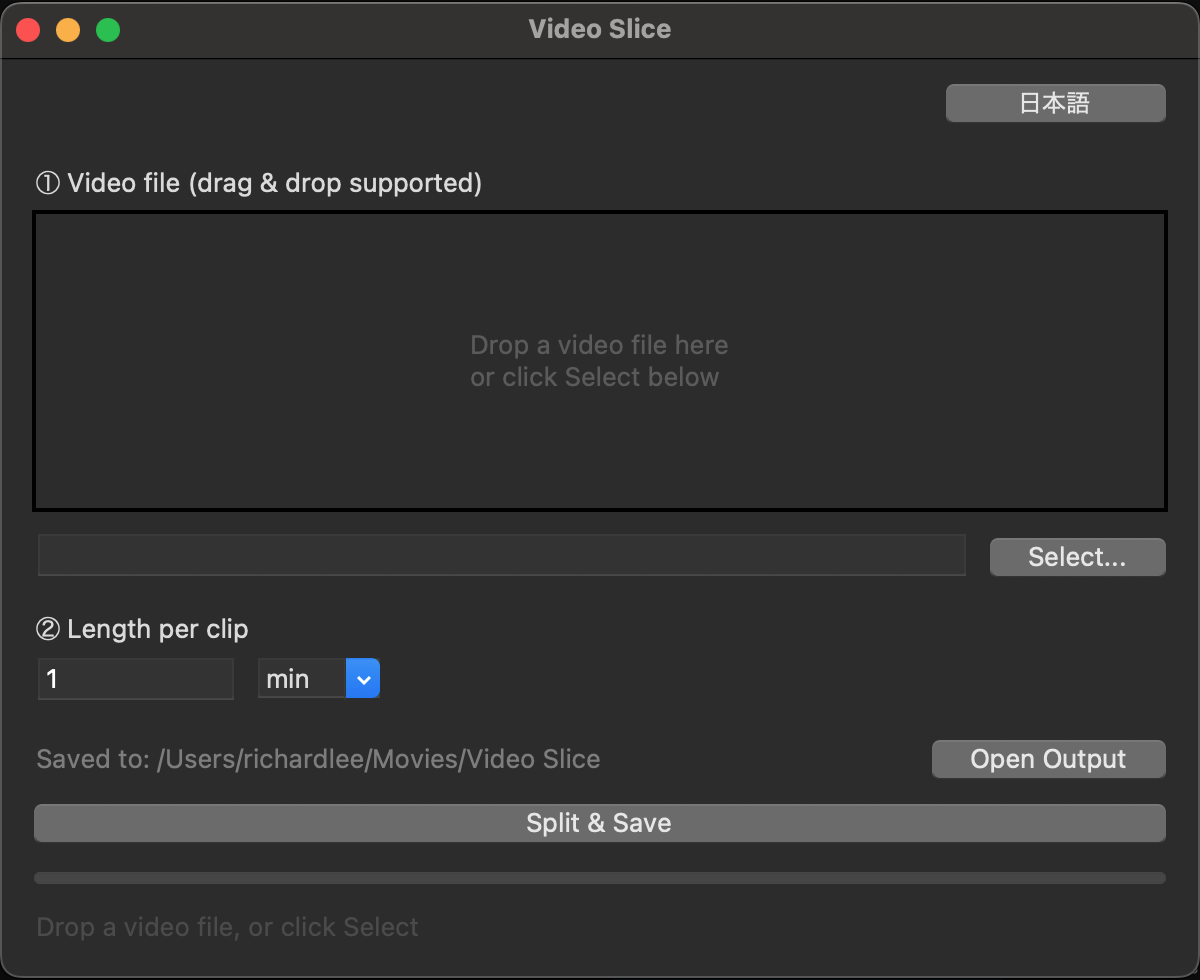
Drag & drop
No menus to dig through. Drop the video, hit the button.
Native Mac
Universal binary. Runs on Apple Silicon and Intel. Self-contained.
Three steps. That's the whole thing.
-
1
Drop a video
MP4, MOV, MKV, WebM and more.
-
2
Pick a length
Type a number, choose minutes or seconds.
-
3
Slice
Clips land in
~/Movies/Video Slice/output/.
$3
Get Video Slice
Tiny tool, useful forever. No subscription.
Buy now- macOS 11 Big Sur or later
- Apple Silicon & Intel
- ~150 MB · ffmpeg included
Questions
Is the cut frame-accurate?
Cuts happen at the nearest keyframe (lossless mode), so each clip may be off by a few seconds. This keeps it instant and zero-quality-loss.
What formats are supported?
MP4, MOV, MKV, AVI, WebM, M4V, FLV, WMV.
Where do my files go?
Inputs are copied to ~/Movies/Video Slice/input/ and clips are saved to ~/Movies/Video Slice/output/<video name>/.